

Book Imbalance Backtest (Betfair)
This Rust-only tutorial sends raw Betfair streaming data directly to the Rust BacktestEngine.
It does not use Python or Parquet.
This tutorial backtests a BookImbalanceActor on a Betfair MATCH_ODDS market.
It loads a raw historical streaming .gz file, feeds it through the Rust
BacktestEngine, and tracks the bid/ask quoted-volume imbalance per runner.
Introduction
Betfair is a sports betting exchange where participants back (bid) and lay (ask) outcomes at decimal odds. Each runner has its own L2 order book that behaves like a financial order book.
The actor reads OrderBookDeltas for every runner. It keeps batch and cumulative totals for bid volume (back
orders) and ask volume (lay orders). It calculates batch and cumulative imbalance as follows:
imbalance = (bid_volume - ask_volume) / (bid_volume + ask_volume)A positive value indicates more backing volume than lay volume for the outcome. Sports traders use this as an initial signal, often with price momentum or market-wide features.
A release build processes about three million data points per second with full order book maintenance in the matching engine.
Prerequisites
- A working Rust toolchain (rustup.rs).
- The NautilusTrader repository cloned and building.
- A Betfair historical
.gzfile containing MCM (Market Change Message) data. Source it from Betfair historic data, a third-party archive, or by recording the Exchange Streaming API yourself.
Place the file at:
test_data/local/betfair/1.253378068.gzThe example's DATA_FILE constant points to this gitignored path. The results below use a self-recorded
football MATCH_ODDS market with 3 runners and approximately 82,000 MCM lines over 18 days. The repository does
not include that file. To run without it, pass a bundled sample from test_data/betfair/, such as
test_data/betfair/1-166811431.bz2. The loader also reads .bz2 files.
Loading the data
BetfairDataLoader reads gzip-compressed Betfair Exchange Streaming API
files and parses each line into Nautilus domain objects:
use nautilus_betfair::loader::{BetfairDataItem, BetfairDataLoader};
use nautilus_model::types::Currency;

let mut loader = BetfairDataLoader::new(Currency::GBP(), None);
let items = loader.load(&filepath)?;
The loader returns a Vec<BetfairDataItem>:
| Variant | Description | Maps to Data enum? |
|---|---|---|
Instrument | Runner definition from market definition. | No (added separately) |
Status | Market status transition (PreOpen, Trading...). | Yes, Data::InstrumentStatus |
Deltas | Order book snapshot or delta update. | Yes, Data::BookDeltas |
Trade | Incremental trade tick from cumulative volumes. | Yes, Data::Trade |
Ticker | Last traded price, volume, BSP near/far. | - |
StartingPrice | Betfair Starting Price for a runner. | - |
BspBookDelta | BSP-specific book delta. | - |
InstrumentClose | Settlement event. | Yes, Data::InstrumentClose |
SequenceCompleted | Batch completion marker. | - |
RaceRunnerData | GPS tracking data (horse/greyhound racing). | - |
RaceProgress | Race-level progress data. | - |
CricketMatch | Cricket match data (from CCM). | - |
The backtest engine accepts the Data enum. The example converts the required variants and skips Status and
the Betfair-specific types:
use nautilus_model::data::Data;

let mut instruments = AHashMap::new();
let mut data: Vec<Data> = Vec::new();

for item in items {
    match item {
        BetfairDataItem::Instrument(inst) => {
            instruments.insert(inst.id(), *inst);
        }
        BetfairDataItem::Deltas(d) => {
            data.push(Data::BookDeltas(Box::new(d)));
        }
        BetfairDataItem::Trade(t) => {
            data.push(Data::Trade(t));
        }
        BetfairDataItem::InstrumentClose(c) => {
            data.push(Data::InstrumentClose(c));
        }
        _ => {}
    }
}
Data::BookDeltas boxes its OrderBookDeltas payload to keep the enum small.
The loader emits instruments on every market definition update. The map removes duplicates and keeps the latest version of each instrument.
The Status variant carries market status transitions (PreOpen, Trading,
Suspended, Closed). This example skips it, so it does not replay status
transitions. If you extend this into a strategy that places orders, add a
BetfairDataItem::Status(s) => data.push(Data::InstrumentStatus(s)) arm.
The engine routes Data::InstrumentStatus to the matching engine, which
then sees market suspensions and closures from the stream.
The actor
NautilusTrader ships BookImbalanceActor in the trading crate's examples
module. The example wires it up with a per-runner instrument list and a
log interval:
use nautilus_trading::examples::actors::BookImbalanceActor;

let actor = BookImbalanceActor::new(instrument_ids, 5000, None);
engine.add_actor(actor)?;
The second argument sets the log interval: one progress line every 5,000 updates per runner. The example sets
this interval through the LOG_INTERVAL constant. For more detailed panel data, change the constant to 200
and rebuild the example.
The full source is at
crates/trading/src/examples/actors/imbalance/actor.rs.
How it works
A DataActor in Rust needs three pieces:
- A struct with a
DataActorCorefield and your own state. nautilus_actor!(YourType)to connect the core, plus aDebugimplementation.- The
DataActortrait implementation with your callbacks.
The framework provides blanket Actor and Component implementations for runtime actors. For a struct with a
DataActorCore, the nautilus_actor! macro supplies the native runtime connections. Actor code only
implements the callbacks it needs.
At startup, the actor subscribes to OrderBookDeltas for each instrument. On each update, it sums volume from
the individual deltas for each side and updates the totals. On stop, it prints a summary for each instrument.
With managed: false in subscribe_book_deltas, the data engine does not keep a separate order book in the
cache for the actor. The exchange matching engine still maintains its own book through book.apply_delta() on
every delta. If your actor needs the full book state from self.cache().order_book(&instrument_id), set
managed: true.
Backtest engine setup
Create the engine and venue
Betfair is a cash-settled betting exchange. The venue uses
AccountType::Cash, OmsType::Netting, and BookType::L2_MBP:
let mut engine = BacktestEngine::new(BacktestEngineConfig::default())?;

engine.add_venue(
    SimulatedVenueConfig::builder()
        .venue(Venue::from("BETFAIR"))
        .oms_type(OmsType::Netting)
        .account_type(AccountType::Cash)
        .book_type(BookType::L2_MBP)
        .starting_balances(vec![Money::from("1_000_000 GBP")])
        .fee_model(FeeModelAny::MakerTaker(MakerTakerFeeModel::zero()).into())
        .build()?,
)?;
Add instruments, actor, and data
for instrument in instruments.values() {
    engine.add_instrument(instrument)?;
}

let actor = BookImbalanceActor::new(instrument_ids, 5000, None);
engine.add_actor(actor)?;

engine.add_data(data, None, true, true)?;
The add_data parameters are (data, client_id, validate, sort). With validate: true, the engine checks
that the first element's instrument is registered. It assumes that the batch is homogeneous. With sort: true, it sorts the data by timestamp.
Run
engine.run(None, None, None, false)?;The four parameters are (start, end, run_config_id, streaming). With None for start and end, the
engine uses the full time range of the loaded data.
What happens during the run
For each data point in timestamp order the engine:
- Advances the clock to the data timestamp.
- Routes the data to the simulated exchange, which applies each delta to
the per-instrument
OrderBookand runs the matching engine cycle. - Publishes the data through the data engine and message bus, which calls
the actor's
on_book_deltascallback. - Drains command queues and settles venues (processes any pending orders).
The matching engine maintains a full order book for each instrument. The example has no orders to match. If
you replace the actor with a Strategy, the strategy can use that book state.
Results
The self-recorded MATCH_ODDS dataset has three runners and 143,098 data points. A release build completes the run in approximately 48 ms:
--- Book imbalance summary ---
  1.253378068-2426.BETFAIR   updates: 53197  bid_vol: 212225339.34  ask_vol: 117422531.85  imbalance:  0.2876
  1.253378068-48783.BETFAIR  updates: 36475  bid_vol:  52506905.49  ask_vol:  19104694.72  imbalance:  0.4664
  1.253378068-58805.BETFAIR  updates: 25426  bid_vol:  24295351.82  ask_vol:  25692733.11  imbalance: -0.0280
Runner 2426 (the eventual winner, settled at BSP 2.22) ends at +0.288. Backing flow exceeds lay flow
throughout the market. Runner 48783 has stronger backing pressure (+0.466) over fewer updates. Runner
58805 ends close to neutral (-0.028).
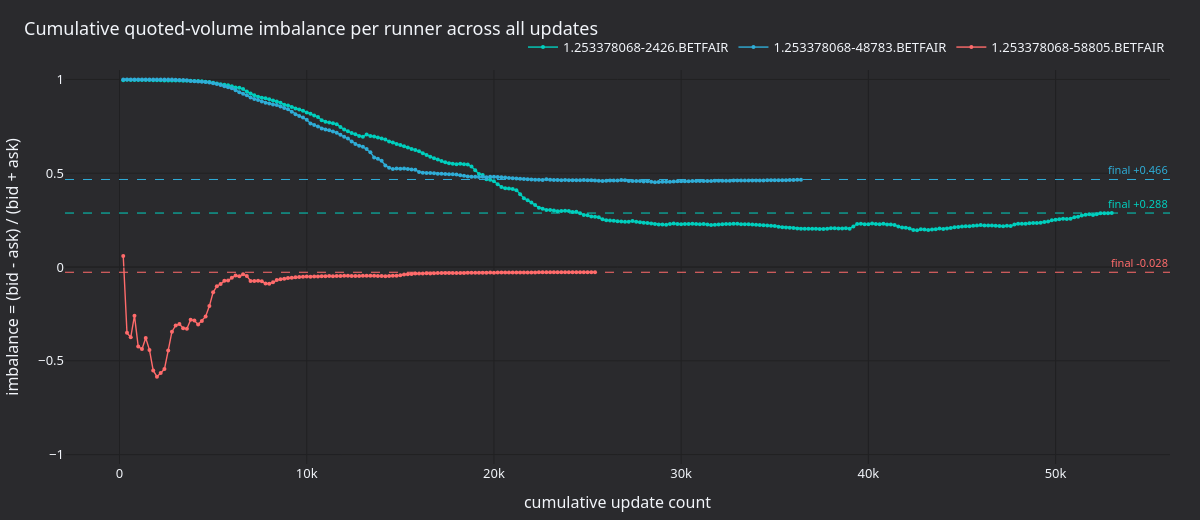
Figure 1. Cumulative (bid - ask) / (bid + ask) per runner across the
~143k updates of the market lifetime. Dashed lines mark each runner's final
imbalance.
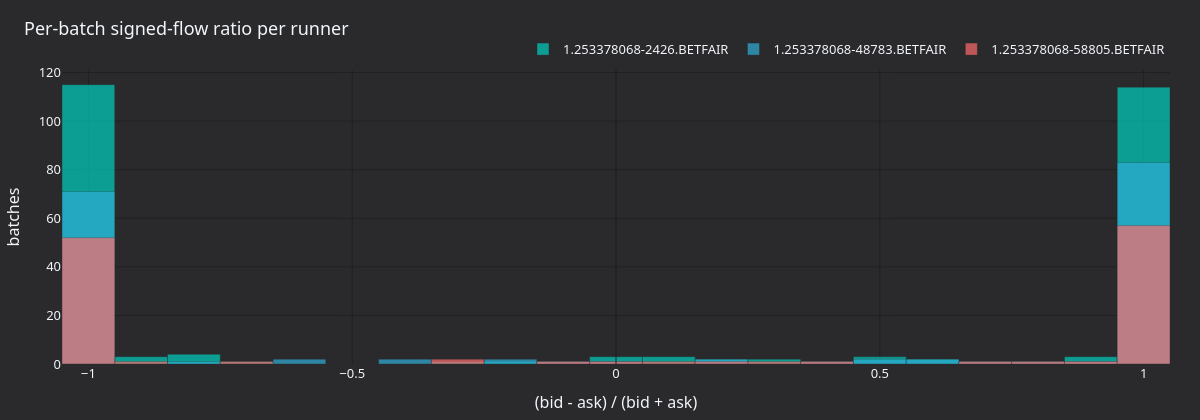
Figure 2. Distribution of per-batch signed flow ratio
(bid - ask) / (bid + ask) over LOG_INTERVAL = 200 batches per
runner. The shape of each runner's batch distribution is a sharper signal
than the cumulative imbalance.
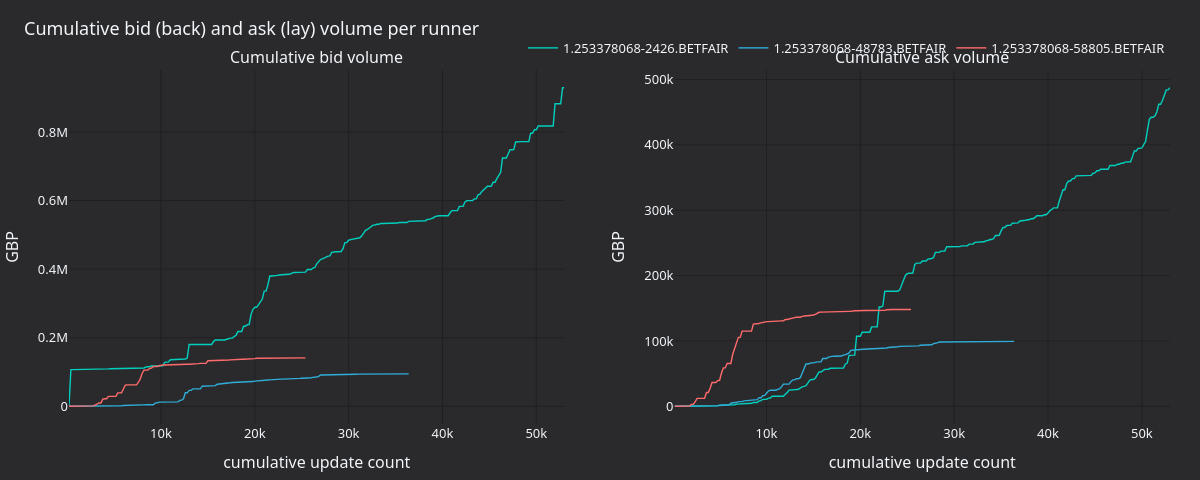
Figure 3. Cumulative back (bid) and lay (ask) volume per runner. Both sides are non-monotonic: lay flow occasionally outpaces back flow within short bursts even when cumulative imbalance stays positive.
Regenerate the panels
The actor logs [runner] update #N: batch bid=B ask=A cumulative imbalance=I
on every Nth update. The renderer parses those lines and writes static PNGs
using the nautilus_dark tearsheet theme.
Set the LOG_INTERVAL constant in betfair_backtest.rs to 200 first.
After building NautilusTrader from source, run these commands from the repository root:
make sync

cargo run -p nautilus-betfair --features examples --release \
    --example betfair-backtest > /tmp/betfair.log 2>&1

BETFAIR_LOG=/tmp/betfair.log \
    uv run --project python --no-sync \
        python docs/tutorials/assets/backtest_book_imbalance_betfair/render_panels.py
Running the example
# Debug build
cargo run -p nautilus-betfair --features examples --example betfair-backtest

# Release build (recommended)
cargo run -p nautilus-betfair --features examples --release --example betfair-backtest

# Custom data file
cargo run -p nautilus-betfair --features examples --release --example betfair-backtest -- path/to/file.gz

# Shipped sample file
cargo run -p nautilus-betfair --features examples --release --example betfair-backtest -- test_data/betfair/1-166811431.bz2
Complete source
The complete example is at
crates/adapters/betfair/examples/betfair_backtest.rs.
Next steps
- Strategy: Replace the actor with a
Strategyimplementation that places back/lay orders based on the imbalance signal. See theEmaCrossexample incrates/trading/src/examples/strategies/ema_cross/strategy.rsfor the pattern. - Managed books: Set
managed: trueinsubscribe_book_deltas. Read the full book throughself.cache().order_book(&id)for top-of-book spread, depth ratios, or weighted mid-price. - Multiple markets: Load several
.gzfiles and run them through the same engine to test cross-market signals.
Delta-Neutral Options Strategy (Derive)
This tutorial runs the shared DeltaNeutralVol strategy with the Derive adapter. The shipped example discovers ETH options and selects an out-of-the-money...
Composite Market Making on Lighter RWA with Databento US Equities NVDA
This tutorial runs the shipped [CompositeMarketMaker][composite-market-maker] strategy on Lighter's NVDA-PERP.LIGHTER RWA market with Databento NVDA.EQUS...